


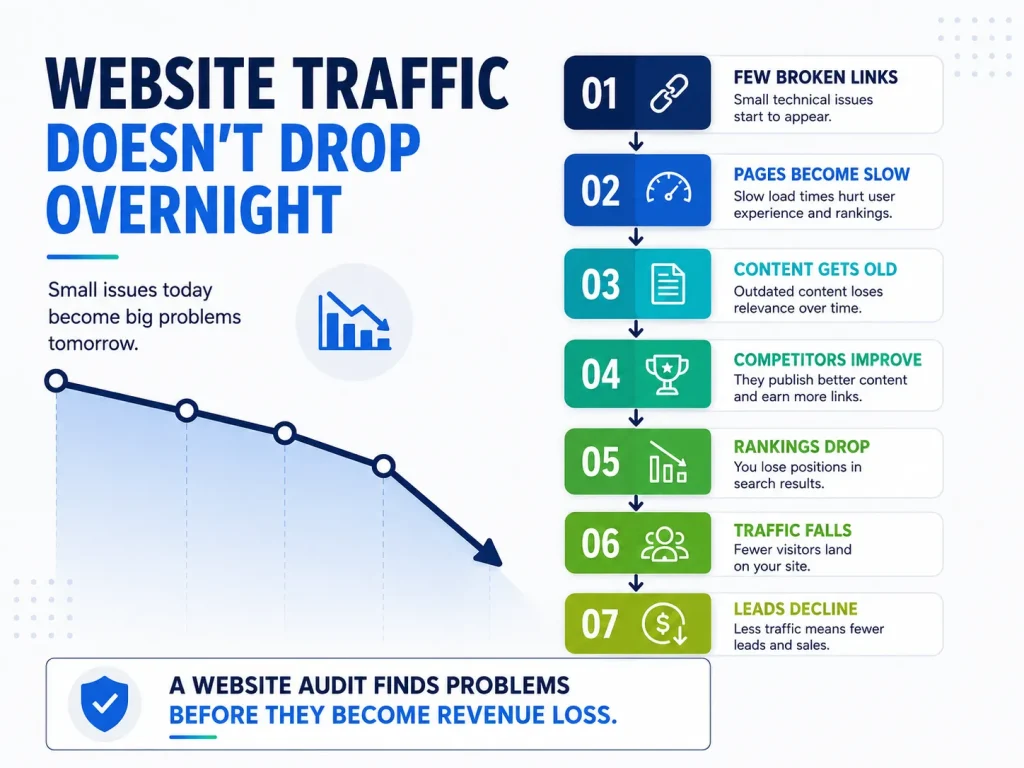
Most websites don’t break all at once. Instead, they slowly lose traffic, one spot at a time in search results. Visits drop little by little, and a quarter that should have grown ends up flat. By the time you see the loss in sales, the problem has likely been there for months. An audit helps you catch these issues early and figure out what’s really wrong.
What is Meant by Technical SEO Audit
A website audit checks how easy it is to find, use, and make money from your site. Before starting one, people often ask what it includes. The honest answer is that a good audit pulls together several different checks into one big picture. It looks at:
- Where your site ranks in search results and whether that’s going up or down.
- The behind-the-scenes stuff: how easily search engines can crawl and index your site, how fast pages load, and if there are any broken links.
- Whether your content matches what people are actually searching for.
- Your page titles, descriptions, and images, things that affect how your site appears in search.
- How your site works on mobile phones and whether your analytics show that visitors are taking action.
Looking at any one of these alone doesn’t tell you much. A fast site won’t do well if the content is weak. Great content won’t rank if search engines can’t reach it. Doing everything together helps you see how each part affects the others. That’s also why a partial audit often misses the real problem.
Step-by-Step Method to Do a Website Audit
These are the steps you have to follow to perform a Website Audit; run it in sequence.
Begin by measuring your current performance
Before you begin, document your current position. Clearly list your key products and services, and note which pages they appear on. Pull performance data from Google Search Console and Google Analytics 4 to understand how those pages are currently performing.
Skipping this step is easy to do, but it’s also the main reason why many audits fail to deliver measurable results. This groundwork is what gives your audit a clear baseline and a real purpose.
Crawl the Website for Technical Issues
A technical SEO audit uses a tool like Screaming Frog to scan your entire website. Then, it checks what the tool finds against data from Google Search Console. The goal is to uncover hidden problems, such as broken links, redirect chains that slow things down, duplicate pages that waste search engine resources, pages with no links pointing to them, and errors in your sitemap or robots file.
Site speed is also part of this audit, measured through Google’s Core Web Vitals, three key metrics that track how fast your site loads, how quickly it responds to clicks, and whether elements shift around while loading.
Fixing these issues is worth the effort. Sites that meet Google’s Core Web Vitals standards tend to see about 24% more engagement from users. If your site runs on complex integrations or a custom setup, Microgility offers a specialized technical SEO audit to handle this stage in detail.
Read the Content
Content is judged by two things: the person reading it and the search engine ranking it. Good pages are clear, original, and clearly match what the visitor was looking for. Make sure your main keywords appear in the right places, but don’t overdo it, too many keywords can look like spam to Google.
Pages that are short or outdated are usually the first ones to fix. You can rewrite them or combine two weak pages into one stronger page. In fact, merging two so-so pages into a single solid one often works better than trying to improve each one separately.
Check the metadata and the images
Title tags and meta descriptions do two jobs: they tell search engines what your page is about, and they convince people to click on your result in search. Keep titles around 50 to 60 characters, put the most important keyword first, and make sure every page has a unique title; never repeat the same one.
Images are often overlooked in audits, but that’s a mistake. Every image should have helpful alt text and a clear file name. Without these, images just slow down your page without helping your search visibility at all.
Pressure-test the mobile experience
Most of your website traffic already comes from mobile phones, over 60% of global visits, in fact. And speed matters a lot: just one extra second of loading time on mobile can cost you up to 20% of your sales.
So don’t just rely on a desktop screen shrunk down to look like a phone. Test your site on actual mobile devices. Pay close attention to how it looks, whether buttons are easy to tap, and how fast everything loads.
Focus on What Converts
Traffic that doesn’t turn into sales or leads is just wasted money. Use Google Analytics 4 to track where your visitors come from, where they leave your site, and which pages actually result in a purchase or a sign-up.
When people visit but don’t convert, it often points to problems with your design or your writing, issues that search rankings alone won’t reveal. Fixing these gaps is usually one of the quickest and easiest ways to see real results from your audit.
AI Visibility
Search doesn’t run only through Google anymore. It runs through AI Overviews, ChatGPT, Perplexity, and a growing list of answer engines, and a current audit checks that their crawlers aren’t blocked and that your structured data gives them enough to understand and cite you.
How Often Should you Audit your Website?
That depends on how frequently your site changes. For most active websites, a full audit once every three months is a good rule of thumb. In between, quick monthly spot-checks help catch small issues before they turn into big problems. This routine keeps technical issues from piling up faster than you can fix them.
But don’t just follow a calendar. Some situations call for an immediate audit: right before and after a redesign or platform change, soon after Google releases a major update, or any time your rankings, traffic, or ad performance suddenly drop for no clear reason. If you’re unsure whether your site needs one right now, Microgility offers a guide that explains the warning signs to watch for.
Final Thought:
You can learn how to do a website audit at a basic level yourself. Where it gets harder is depth and judgment: knowing which of the forty issues a crawler spits out actually moves rankings and which are noise, and what order to fix them in.
Microgility reports a 99% client satisfaction rate and 97% client retention across that work. The audit is the easy part to understand and the hard part to act on, and acting on it is what moves rankings and revenue. Get in touch for a free review, and Microgility will start with a full SEO website audit of where your site stands today.

